
Q4LUCK / 01
Four digits. Let’s get into it.
New to the four-digit experience? Start here, then check the current instructions inside your Q4Luck player area.

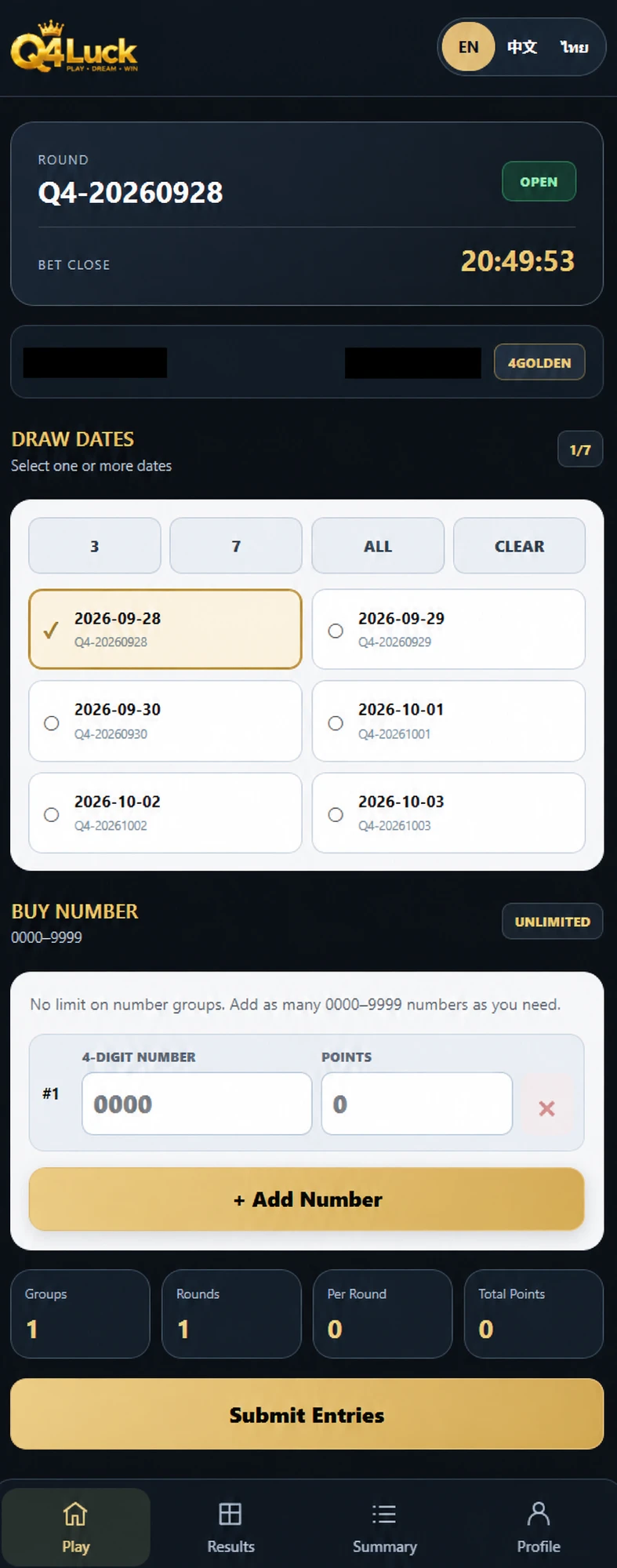
Interface example
See how the player screen works
- 01
Choose a date
Check the round and selected date before entering numbers.
- 02
Enter four digits
Use the number field and review each group before confirmation.
- 03
Review your entries
Check the summary and follow the instructions shown in the game.
Illustrative view from supplied game captures; account details are masked. Dates, numbers and totals shown are examples, not live results.
Q4LUCK / VIDEO
Watch the interface walkthrough
A short, silent demonstration of entering numbers, reviewing entries and viewing results. The results shown are from a separate round, not the outcome of these entries. Recorded screens, not live data.
Start with four digits
Q4Luck uses four-digit numbers from 0000 to 9999. Keep the full number, including any zeros at the beginning: 0042 is a four-digit number, not simply 42. You can prepare one or more number groups in the player interface. Before moving on, check that each group matches the number you intended.
Check it before you confirm it
The player interface lets you enter points for each number group and review a confirmation summary. Read that summary carefully: the number, points and round should all match what you selected. A submitted form on this website is a support enquiry; it does not automatically create an in-game entry.
Follow the round, then the result
Check the active round and its closing status in the player area. The result board distinguishes prize categories, including Consolation, Special, Third, Second and First. A reveal in progress is not a final result. Use the completed result and your confirmed record when reviewing a round. Timings and availability should be checked in the current app.
Keep the useful details
If something looks unexpected, keep the round identifier, number and any confirmation reference before contacting support. Avoid repeatedly submitting the same action while you are unsure whether the first attempt completed. Never share your password or one-time codes in chat.